


تطبيق الحضور الرسميOfficial attendance app

Arak Timeحضور أكثر سهولة وأمانًاAttendance made secure and simple

سجّل حضورك وانصرافك من المواقع المعتمدة، عبر تطبيق مرتبط بموظفك وجهازك، ومصمم ليمنح شركتك نتائج دقيقة وموثوقة.

Check in and out from approved locations using an app securely linked to your employee profile and device.
حمّل التطبيقDownload the app
استخدم روابط التنزيل الرسمية فقط، ولا تشارك رمز التفعيل. Use official download links only and never share your activation code.
واجهة تطبيق Arak Time
QR لتنزيل Arak Timeافتح على جوالكOpen on your phoneامسح رمز QRScan the QR code

ابدأ خلال دقائقGet started in minutes

ثلاث خطوات لحضور آمنThree steps to secure attendance

01

نزّل التطبيقDownload the app

اختر متجر جهازك أو استخدم رابط Android المباشر للأجهزة المعتمدة.

Choose your device store or use the direct Android link for approved devices.

02

فعّل جهازكActivate your device

امسح رمز QR المخصص لك من لوحة التحكم لربط التطبيق بحسابك.

Scan your one-time QR code from the dashboard to link your account.

03

سجّل حضوركRecord attendance

سجّل الدخول أو الخروج عند وجودك ضمن أحد المواقع المعتمدة.

Check in or out while you are within an approved attendance location.

مصمم للعمل بوضوحDesigned for clarity

كل ما يحتاجه الموظف، دون تعقيدEverything employees need, without complexity

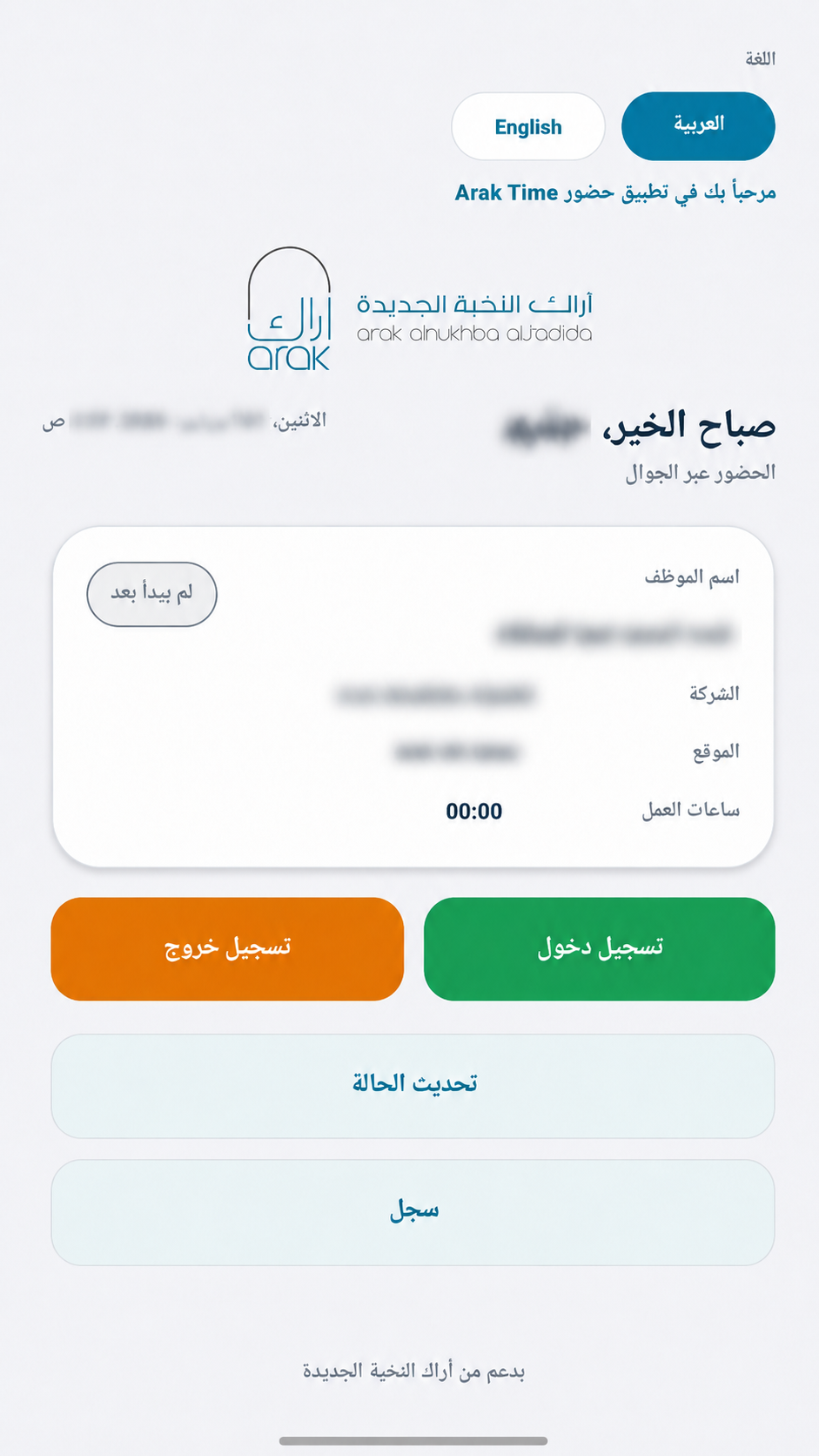
واجهة مباشرة تعرض حالة الدوام، الموقع وساعات العمل، وتضع تسجيل الدخول والخروج في متناول الموظف.

A focused interface for attendance status, approved location and work hours, with check-in and check-out always within reach.
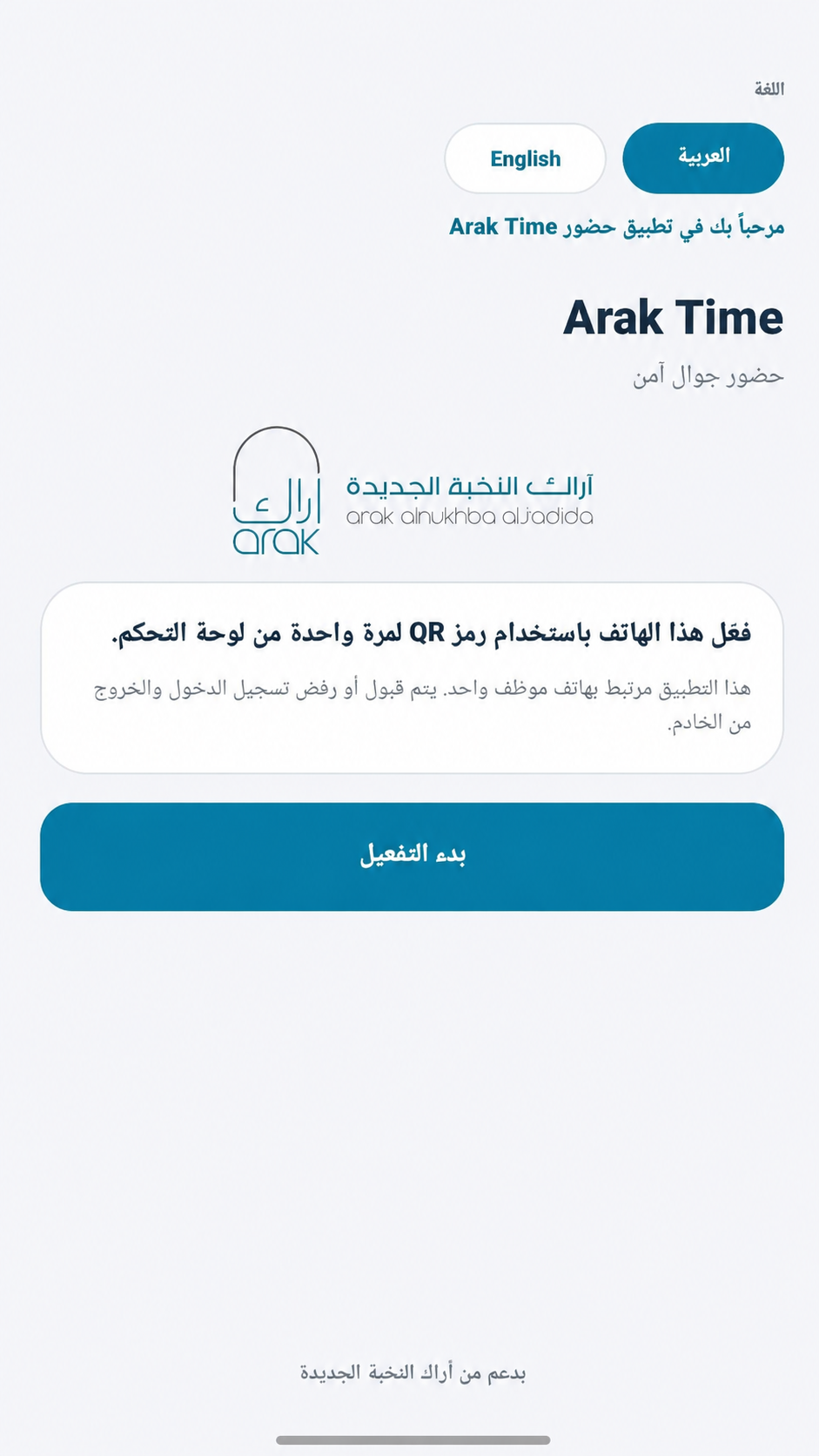
تفعيل آمن لمرة واحدةSecure one-time activationربط الموظف بجهازه عبر رمز QR مخصص.Link each employee to an approved device.
تحقق من الموقعLocation verificationاعتماد تسجيل الحضور من المواقع المسموحة.Attendance from approved locations.
دعم العربية والإنجليزيةArabic and English supportتجربة واضحة ومناسبة لجميع الموظفين.A clear experience for every employee.
شاشة تفعيل Arak Time
تفعيل الجهاز الآمنSecure device activation
شاشة الحضور في Arak Time
تسجيل الحضور والانصرافCheck-in and check-out

معلومات سريعةQuick answers

الأسئلة الشائعةFrequently asked questions

كيف أحصل على رمز التفعيل؟How do I get my activation code?
يُنشئ مسؤول النظام رمز QR مخصصًا لموظفك من لوحة التحكم. استخدمه مرة واحدة لتفعيل الجهاز المعتمد.Your administrator generates a one-time QR code from the dashboard for your employee profile and approved device.
لماذا لا يقبل التطبيق موقعي؟Why is my location not accepted?
تأكد من تشغيل خدمة الموقع ومنح التطبيق الإذن المطلوب، ثم تحقق من وجودك داخل نطاق أحد مواقع الحضور المعتمدة.Enable location services, grant the required permission, and confirm that you are inside an approved attendance location.
هل يمكن استخدام الحساب على أكثر من جهاز؟Can I use my account on multiple devices?
التفعيل مرتبط بموظف وجهاز معتمد. تواصل مع مسؤول النظام عند استبدال الهاتف أو الحاجة إلى إعادة التفعيل.Activation is linked to an employee and an approved device. Contact your administrator when replacing your phone.
من أين أحمل أحدث نسخة؟Where can I download the latest version?
استخدم روابط Google Play أو App Store في هذه الصفحة. رابط Android المباشر يشير دائمًا إلى ملف APK المعتمد المرفوع باسم arak-time.apk.Use the Google Play or App Store links on this page. The direct Android link always points to the approved arak-time.apk file.

هل تحتاج مساعدة في التفعيل؟Need help with activation?

راجع صفحة الدعم للحصول على خطوات التفعيل وحلول المشكلات الشائعة.

Visit support for activation steps and solutions to common issues.

الانتقال إلى الدعمOpen support
الدعمSupport